HW 4: Drawing Generally and Concisely
Due: February 23, 2016 at 10:30pm
Summary: In this assignment, you will experiment with different kinds of transformations of both individual drawings and lists of drawings.
Purposes: To further practice with the drawings-as-values model. To consider concise algorithms for creating images with repetitive elements. To gain further experience writing procedures.
Collaboration: You must work with your assigned partners on this assignment. You must collaborate on every problem - do not break up the work so that one person works on problem 1, another on problem 2, and another on problem 3. (The “"don't break up the work” policy applies on every assignment. This note is just a reminder.) You may discuss this assignment with anyone, provided you credit such discussions when you submit the assignment.
Submitting: Email your answer to
<csc151-01-grader@grinnell.edu>. The title of your email should have
the form [CSC 151.01] Assignment 4 and
should contain your answers to all parts of the assignment. Scheme
code should be in the body of the message. You should not attach
any images; I should be able to re-create them from your code.
Warning: So that this assignment is a learning experience for everyone, we may spend class time publicly critiquing your work.
Assignment
Problem 1: Finding the Center
There are a variety of models for the “center” of a drawing. For circles and squares (and ellipses and rectangles), the model is pretty easy, the center is horizontally midway between the leftmost point and the rightmost point, and vertically midway between the topmost point and the bottommost point. But for compound shapes, we might also want to consider the relative size of the subshapes.
However, even for more complex shapes, we probably need to be able to find the center of the subshapes, and at some point, everything breaks down into a circle or a square (or an ellipse or rectangle).
(a) Write a procedure, (, that finds the x coordinate of
the center of a drawing using the simple metric of “horizontally
midway between the leftmost point and the rightmost point”.
simple-center-x
drawing)
(b) Write a procedure, ( that finds the y coordinate of
the center of a drawing using the simple metric of “vertically
midway between the topmost point and the bottommost point”.
simple-center-y
drawing)
Problem 2: Testing Your Procedures
Write a test suite for simple-center-x and
simple-center-y.
You should make sure to conduct all of the following tests.
- The center is at the origin.
- The center is along the x axis.
- The center is along the y axis.
- The center is in quadrant I (and II and III and IV).
- Circles, squares, ellipses, rectangles, and compound drawings.
- Relatively small drawings.
- Relatively large drawings.
- Drawings whose center coordinates are integers.
- Drawings whose center coordinates are not integers.
- Anything else you think is applicable.
Problem 3: Adding “Outlines”
(a) Define a procedure that corresponds to the following documentation. Include this documentation along with your definition of the procedure.
;;; Procedure:
;;;   outline
;;; Parameters:
;;;   drawing, a drawing
;;; Purpose:
;;;   Create an "outline" of drawing.
;;; Produces:
;;;   my-outline, a drawing
;;; Preconditions:
;;;   No additional.
;;; Postconditions:
;;;   my-outline is 10% larger than drawing.  That is.
;;;     (drawing-width my-outline) = (* 11/10 (drawing-width drawing))
;;;     (drawing-height my-outline) = (* 11/10 (drawing-height drawing))
;;;   my-outline is the same "shape" as drawing.
;;;   my-outline is colored grey.
;;;   my-outline is centered at the same location as drawing.
;;;     (simple-center-x my-outline) = (simple-center-x drawing)
;;;     (simple-center-y my-outline) = (simple-center-y drawing)
Examples of the procedure in action are forthcoming.
(b) Define, but do not document, a procedure
( that groups a drawing together
with its outline. The outline should appear behind the original
drawing.
pair-with-outline
drawing)
Examples of the procedure in action are forthcoming.
(c) Write, but do not document, a procedure,
(
that behaves much like pair-with-custom-outline
drawing
color
hincrement
vincrement)pair-with-outline,
except that one can specify the color of the outline and how much
bigger the outline is horizontally and vertically. Note that the
earlier outline
Note: As in the case of pair-with-outline,
you may find it helpful to write a separate procedure to
create the outline.
(d) Document pair-with-custom-outline
Problem 4: Smaller Neighbors
We often ask students to write a procedure,
add-smaller-neighbor, that adds a slightly smaller
neighbor to an image.
In solving this problem, many students write something like the following code.
(define add-smaller-neighbor
  (lambda (drawing)
    (drawing-group drawing
                   (hshift-drawing (drawing-width drawing)
                                   (scale-drawing .75 drawing)))))
This procedure works fine if the input drawing is on the left margin of the screen. Unfortunately, if the input drawing is not on the left margin of the screen, the smaller neighbor overlaps the input drawing, rather than being on the side.
(define thingy
 (hshift-drawing
  100
  (vshift-drawing
   60
   (scale-drawing
    80
    (drawing-group
     (recolor-drawing "black" drawing-unit-square)
     (recolor-drawing "red" drawing-unit-circle))))))

|
(image-show (drawing->image thingy 200 100))
|

|
(image-show (drawing->image (add-smaller-neighbor thingy) 200 100))
|
Why do we have this problem? Because drawing-scale
scales everything - not just the shape (or
shapes), but also the left and top offset.
How do we solve the problem? There are a variety of options. Here are two. You might choose to temporarily shift the drawing back to the left margin and then shift the pair back after making the neighbor. If that's too much effort, you can come up with a better formula for how much to shift the right neighbor. (The math isn't too hard.)
It will be easiest if we break the problem down into two parts: Making the right neighbor and adding it to the original drawing.
Once we know how to make a right neighbor, adding it is easy.
(define add-smaller-right-neighbor
  (lambda (drawing)
    (drawing-group drawing (smaller-right-neighbor drawing))))
Your goal is therefore to write smaller-right-neighbor.
To help you in this endeavor, here's some documentation.
;;; Procedure:
;;;   smaller-right-neighbor
;;; Parameters:
;;;   drawing, a drawing
;;; Purpose:
;;;   Create a smaller version of drawing, situated immediately to the
;;;   right of drawing.
;;; Produces:
;;;   neighbor, a drawing
;;; Preconditions:
;;;   (drawing-width drawing) > 0
;;;   (drawing-height drawing) > 0
;;; Postconditions:
;;;   (drawing-width neighbor) = (* 0.75 (drawing-width drawing))
;;;   (drawing-height neighbor) = (* 0.75 (drawing-height drawing))
;;;   (drawing-top neighbor) = (drawing-top drawing)
;;;   (drawing-left neighbor) = (drawing-right drawing)
;;;   The colors and shapes of neighbor are essentially the same as
;;;     those of drawing.
(a) Implement
smaller-right-neighbor. That is, define
the procedure.
Make sure that you try your procedure on a variety of drawings, including some drawings that have their left edge to the left of the image (that is, less than zero) and that have their top edge at various places.
(b) What if we want the right neighbor to be something other than 75% of
the original drawing? We might add a second parameter to specify the
scale factor. Implement, but do not document, a procedure,
add-scaled-right-neighbor, that takes as
parameters both a drawing and a scale factor. You can assume that the
scale factor is positive.
Hint: You will probably want to write a
scaled-right-neighbor procedure that also takes
as parameters both a drawing and a scale factor. If you do choose
to write that procedure, you should document it.
Once again, you should make sure to check a variety of cases, including scale factors both smaller and larger than 1.
(c) Document and implement a procedure,
add-scaled-left-neighbor that behaves much like
add-scaled-right-neighbor except that the neighbor is
on the left, rather than the right. Make sure to specify the top,
left, width, and height of the resulting drawing.
(d) Implement a procedure,
add-scaled-bottom-neighbor that behaves much like
add-scaled-right-neighbor, except that (i) the
neighbor is below the original drawing, rather than to the side,
and (ii) the center of the neighbor is directly below the center
of the original drawing.
Problem 5: Circling Shapes
In the lab on lists
of drawings, you observed that we could create interesting
patterns by making a list of a simple shape and two lists of horizontal
and vertical offsets, and then combining it all with appropriate calls
to map
Let's suppose we want to take some simple shape and make a circle from 36 copies of that shape. Here's the start of a program to do just that.
(define circle-of-drawings
  (lambda (drawing)
    (map (lambda (i)
           (hshift-drawing
            (circle-y-coord i)
            (vshift-drawing
             (circle-x-coord i)
             drawing)))
         (iota 36))))
Here's a sample use of that procedure.
>(define c5 (scale-drawing 5 drawing-unit-circle))>(image-show (drawing->image (drawing-compose (circle-of-drawings c5)) 200 200))
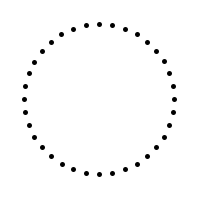
As you may have noted, circle-of-drawings requires
two procedures, circle-x-coordcircle-y-coord
Write circle-x-coordcircle-y-coordsin and cos,
which each take as input angles in radians.
Problem 6: Make Your Own Drawings
You now know a variety of techniques for manipulating drawings
and lists of drawings. Write a procedure that creates interesting
drawings. You may choose what to name your procedure and what
inputs it takes, provided you have at least one input. You must
use map
Important Evaluation Criteria
The first criterion we will use in evaluating your work is correctness. In particular, we will check to ensure that each program or procedure generates an appropriate image.
The second criterion we will use in evaluating your work is conciseness. That is, we will look to see whether your code is short or long for the problem. We will not differentiate short and long variable names, so please use comprehensible names.
The final criterion we will use in evaluating your work is generality. That is, for questions where you are asked to write a procedure, we will look at whether your procedure behaves correctly in a variety of situations.
Extra Credit Opportunities
We may award extra credit for particularly interesting solutions to the last problem.