Exam 2: Expanding our vocabulary: Control structures and new image models
Assigned: Wednesday, 2 March 2016
Due: The due dates for various tasks are as follows.
- 10:30 p.m., Tuesday, 8 March 2016 (electronic)
Important! This examination has an initial code file that you should copy and use as the starting point for your work.
Please read the exam procedures.
Problems
Problem 1: Converting Color Names
Topics: Integer-encoded colors, composition,
lists and map, concision, color names, sectioning
In our explorations of colors, we found that we could start with a
procedure such as irgb-redder that takes a color
as a parameter and produces a new color, and use that procedure to
transform a whole image. We also found that, as humans, we had
difficulty telling what such a procedure did to individual colors.
> (irgb-redder (irgb 210 18 96))
15864416
Things are even less clear when we are dealing directly with color names.
So let's try writing a procedure that helps us learn what the color transformations do in terms of color names. That is, let's consider procedures that transform each color name in a list. Note that this process will be slightly more difficult, because the color transformations expect integer-encoded RGB colors rather than color names.
Write, but do not document, a procedure,
(, that, given a list of
color names, returns a new list of color names, with each color name
in the result list an approximation of the color that results from applying
color-names-much-bluer
color-names)irgb-bluer twice to the corresponding color in
the original list. For example,
>(color-names-much-bluer (list "red" "blue" "green" "black" "white" "grey" "brown" "hotpink" "burlywood" "cornflowerblue"))'("crimson" "blue" "forestgreen" "midnightblue" "white" "mediumpurple" "mediumvioletred" "violet" "thistle" "cornflowerblue")
You may use only one call to map in your procedure. You
may not write separate helper procedures.
You should make the body of this procedure as concise as you can.
You can use color->irgb to convert a color name to
an integer-encoded RGB color and irgb->color-name
to convert an integer-encoded RGB color back to a color name.
> (irgb->string (color->irgb "red"))
"255/0/0"
> (color->irgb "red")
16711680
> (irgb->string 16711680)
"255/0/0"
> (irgb-bluer 16711680)
16711712
> (irgb->string 16711712)
"255/0/32"
> (irgb-bluer 16711712)
16711744
> (irgb->string 16711744)
"255/0/64"
> (irgb->color-name 16711744)
"crimson"
> (irgb->string (color->irgb "crimson"))
"220/19/59"
; Yes, that's the closest we can get to 255/0/64
As you'll note from the examples, because there are many fewer color names than there are colors, Mediascheme approximates, and sometimes the converted color is closer to the original color than to any other color.
Problem 2: Quadrachromic Images
Topics: Conditionals, integer-encoded RGB colors, program style, image transformations
We've noted that we have a fairly wide palette of colors, 16,777,216 (256 x 256 x 256) to be exact. But what if we have only a few colors? For example, what if we have only four.
The first thing we would likely need to do is to develop a procedure to convert any of our 16,777,216 to one of those colors. But which one? Typically, we'd use the closest color. Which color is closest? It depends on the distance metric you use. Here's one.
; (irgb-distance c1 c2)
;   A metric for the "distance" between two integer-encoded RGB colors.
(define irgb-distance
  (lambda (c1 c2)
    (inexact->exact
     (round
      (sqrt
       (+ (square (- (irgb-red c1) (irgb-red c2)))
          (square (- (irgb-green c1) (irgb-green c2)))
          (square (- (irgb-blue c1) (irgb-blue c2)))))))))
To make a quadrachromic picture, it might seem like we should simply convert each pixel to the nearest color. Here's a procedure that does just that.
; (irgb-closest-4 original option1 option2 option3 option4)
;   Find the closest of the options to original.
(define irgb-closest-4
  (lambda (original option1 option2 option3 option4)
    (let ([d1 (irgb-distance original option1)]
          [d2 (irgb-distance original option2)]
          [d3 (irgb-distance original option3)]
          [d4 (irgb-distance original option4)])
      (let ([dmin (min d1 d2 d3 d4)])
        (cond
          [(= d1 dmin)
           option1]
          [(= d2 dmin)
           option2]
          [(= d3 dmin)
           option3]
          [else
           option4])))))
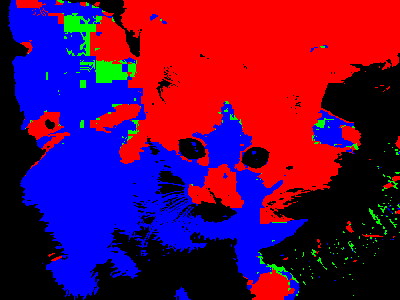
Unfortunately, that strategy does not tend to work very well, as we often end up with large swatches of identical colors.
(image-variant kitten
               (section irgb-closest-4
                        <>
                        (irgb 255 0 0)
                        (irgb 0 255 0)
                        (irgb 0 0 255)
                        (irgb 0 0 0)))
|
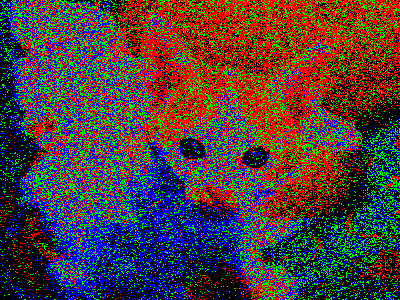
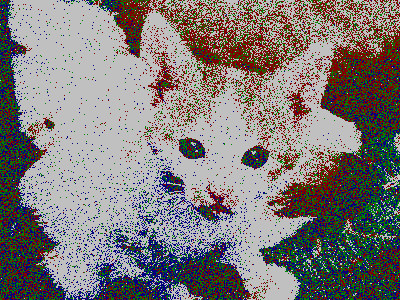
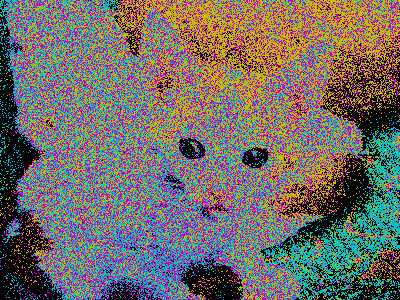
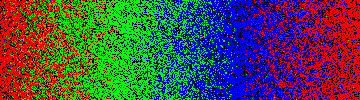
What should we do instead? We should add some randomness to our selection. That is, we should select randomly among the four colors, with higher probability of selecting closer colors and lower probability of selecting further colors.
Document (4P's only) and implement a procedure,
(
that takes five integer-encoded RGB colors as parameters and
randomly returns one of
irgb-speckle-4
original
option1
option2
option3
option4)option1option2option3option4
(image-variant kitten
               (section irgb-speckle-4
                        <>
                        (irgb 255 0 0)
                        (irgb 0 255 0)
                        (irgb 0 0 255)
                        (irgb 0 0 0)))
|
|
(image-variant kitten
               (section irgb-speckle-4
                        <>
                        (irgb 128 0 0)
                        (irgb 0 128 0)
                        (irgb 0 0 128)
                        (irgb 192 192 192)))
|
|
(image-variant kitten
               (section irgb-speckle-4
                        <>
                        (irgb 192 192 0)
                        (irgb 0 192 192)
                        (irgb 192 0 192)
                        (irgb 0 0 0)))
|
|
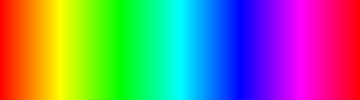
(define rainbow (image-show
                 (image-compute
                  (lambda (col row)
                    (hsv->irgb (hsv col 1 1)))
                  360 100)))
|
|
(image-variant rainbow
               (section irgb-speckle-4
                        <>
                        (irgb 255 0 0)
                        (irgb 0 255 0)
                        (irgb 0 0 255)
                        (irgb 0 0 0)))
|
Hint: irgb-closest-4 gives a
good starting point (at least in terms of the initial values
it computes). You will need to turn those values into some sort
of probability or count, and then select randomly according to that
probability or count. You should turn to your solution or a sample
solution to HW5 for additional ideas.
Problem 3: Scaling Drawings, Revisited
Topics: Drawings as values, documentation
Document (6Ps) and write a procedure,
( that creates a scaled
version of alternate-scale
hpercent vpercent
drawing)drawinghpercentvpercent
Note: You may find it more appropriate to write the tests before you write the procedure.
Problem 4: Checking Enhancements
Topics: Testing
Write an appropriate test suite for alternate-scale.
Make sure to test a wide variety of drawings, positions, and scales.
As you write your tests, you will find it helpful to write a helper something like the following.
(define check-scaling
  (lambda (message original scaled hscale vscale)
    (test-case
     message
     (check-= (drawing-left scaled) (drawing-left original)
              .001
              "left")
     (check-= (drawing-top scaled) (drawing-top original)
              .001
              "top")
     (check-= (drawing-width scaled) (* hscale  (drawing-width original))
              .001
              "width")
     (check-= (drawing-height scaled) (* vscale  (drawing-height original))
              .001
              "height")
     (check-equal? (drawing-color scaled) (drawing-color original)
                   "color")
     (check-equal? (drawing-type scaled) (drawing-type original)
                   "type"))))
Note: We will grade this problem primarily on the “coverage” of your tests; whether you have explored a wide variety of situations, both common and uncommon.
Note: The class mentors suggested that we place
this problem before the one in which you write
alternate-scale, since best practice is to write tests
before you write code. However, since this is your first test
involving tests, we've placed them in the order that many novice
programmers find more comfortable.
Problem 5: Radial Blends
Topics: Color blends, computing circles,
image-compute
In the reading on building images, you learned how to compute an image of circles using the distance of each image pixel from a center point thresholded by the specified radius. In the corresponding lab, you learned how to generalize a linear (horizontal) blend from one color component's value to another. In this problem we will combine those two approaches.
Write, but do not document, a procedure
( that generates an image containing
a radial color
blend where the value of the color's green component is
radial-green-blend
width height
center-col center-row
radius initial
final)initial at
(center-col,
center-row) and final
at all points of a distance of radius from
the center of the circle, while the red and blue components remain
zero; the pixels between the center and the radius should blend
smoothly from initial to
final. Outside the circle, pixels should be
black.
;;; Procedure:
;;;   radial-green-blend
;;; Parameters:
;;;   width, a positive integer
;;;   height, a positive integer
;;;   radius, a positive integer
;;;   center-col, a non-negative integer
;;;   center-row, a non-negative integer
;;;   initial, an integer
;;;   final, an integer
;;; Purpose:
;;;   Create a width-by-height image that contains a green radial blend
;;;   centered at (center-col, center-row).
;;; Produces:
;;;   blend, an image
;;; Preconditions:
;;;   0 <= center-col < width
;;;   0 <= center-row < height
;;;   0 <= initial <= 255
;;;   0 <= final <= 255
;;; Postconditions:
;;;   (image-width blend) = width
;;;   (image-height blend) = height
;;;   For any position (i,j) in the image
;;;     (irgb-red (image-get-pixel blend i j)) = 0
;;;     (irgb-blue (image-get-pixel blend i j)) = 0
;;;   (irgb-green (image-get-pixel blend center-col center-row)) = initial
;;;   For any position (i,j) that is radius away from (center-col,center-row),
;;;     (irgb-green (image-get-pixel blend i j)) = final
;;;   For any other position less than radius away from the center, the
;;;     green component is appropriately scaled between initial and final.
In writing such a procedure, you may find the
euclidean-distance procedure from the reading
helpful. (If you incorporate it into your exam, please be sure to
cite its source.)
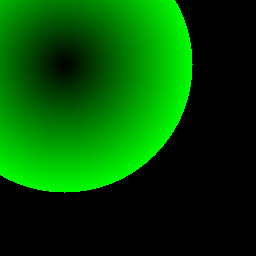
|
(radial-green-blend 256 256 128 64 64 0 255) |
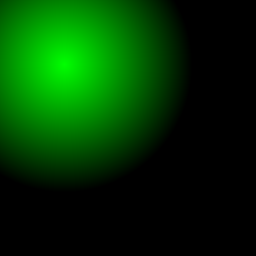
|
(radial-green-blend 256 256 128 64 64 255 0) |
Hint: Your computation
of the green component should look very similar to
horiz-blue-blend. However, instead of transitioning
from column zero to width, the calculation will
span a distance (from the center) of zero up to the radius.
Hint: Locally bind the distance of a given pixel from the center and use that distance both in a conditional test and in the calculation for the color's green component.
Problem 6: Images for Drella
Topics: map and repetition,
copy and paste.
Write a procedure, (,
that makes a row of the specified number of scaled copies of
drella!
source target
n row)source in the image target.
The copies should be scaled so that they fit appropriately.
;;; Procedure:
;;;   drella!
;;; Parameters:
;;;   source, an image
;;;   target, an image
;;;   n, a positive integer
;;;   row, a non-negative integer
;;; Purpose:
;;;   Make a row of the specified number of n scaled copies of
;;;   the source image in the target image.
;;; Produces:
;;;   [Nothing; called for the side effect]
;;; Preconditions:
;;;   (image-width target) = (image-width source)
;;;   (image-height target) = (image-height source)
;;;   (image-width source) is an integer multiple of n.  That is,
;;;     (integer? (/ (image-width source) n))
;;;   (image-height source) is an integer multiple of n.  That is,
;;;     (integer? (/ (image-height source) n))
;;;   0 <= row < n
;;; Postconditions:
;;;   target now contains n scaled copies of source.
;;;   Each copy is 1/n the width and 1/n the height of source.
;;;   The copies are side-by-side, with the first copy's left edge
;;;     at the left edge of target and the last copy's right edge
;;;     at the right edge of target.
;;;   The top of each copy is row/n from the top of target.
Here are some examples.
> (define kitten (image-show (image-load "/home/rebelsky/Desktop/kitten.jpg")))
> (define sample1 (image-show (image-new 400 300)))
> (define sample2 (image-show (image-load "/home/rebelsky/Desktop/kitten.jpg")))
> (drella! kitten sample1 5 1)
> (drella! sample2 sample2 10 8)
|
sample1
|
|
|
sample2
|
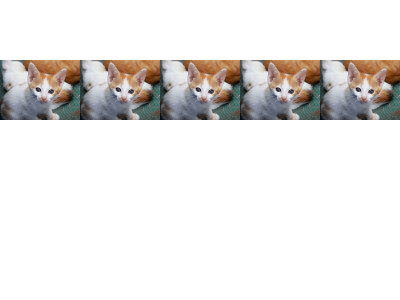
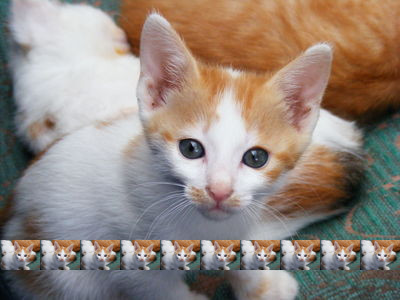
Note that we can use drella! to make an n-by-n grid
of images by using the following procedure.
(define alohraw
  (lambda (source n)
    (let ([target (image-new (image-width source) (image-height source))])
      (map (section drella! source target n <>)
           (iota n))
      target)))
|
(image-show (alohraw kitten 5))
|
|
|
(image-show (alohraw kitten 10))
|
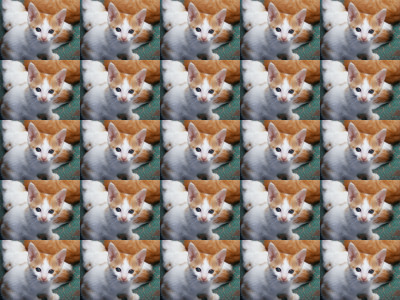
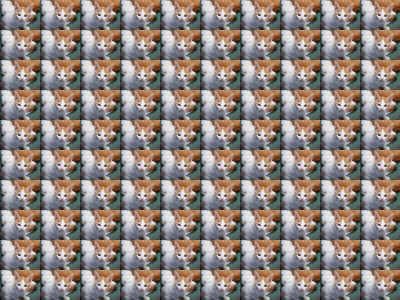
Hint: You will find it easiest if you use some of the procedures we wrote in the lab on copying and pasting.
Problem 7: Code Cleanup
Topics: GIMP tools, code reading, conditionals,
let, documentation
Jordan, Peyton, and Taylor have written a “wicked awesome” procedure that they've named after themselves. When they demonstrate it, you agree that it is clever. However, you find that their code does not meet your instructor's high standards.
(define jpt (lambda (color image y w h x)
(image-select-ellipse! color REPLACE y w (- h y) (- x w)) (if (=
image 1) (image-select-rectangle! color ADD y w (* 1/2 (- h y)) (*
1/2 (- x w))) (if (= 2 image) (image-select-rectangle! color ADD y (+
w (* 1/2 (- x w))) (* 1/2 (- h y)) (* 1/2 (- x w))) (if (= 3 image)
(image-select-rectangle! color ADD (+ y (* 1/2 (- h y))) w (* 1/2 (- h
y)) (* 1/2 (- x w))) (if (= image 4) (image-select-rectangle! color ADD
(+ y (* 1/2 (- h y))) (+ w (* 1/2 (- x w))) (* 1/2 (- h y)) (* 1/2 (-
x w))) (error "I don't like the value" image))))) (image-fill! color)
(image-select-nothing! color) color))
You ask your class mentors what you should do to improve the procedure. They suggest the following.
- “The procedure and parameter names are awful. Figure out what they do and rename them.”
- “I'm not sure why there's such a deeply nested
if. Rewrite it to usecond.” - “Be consistent in how you write your conditions.”
- “There's a lot of repeated code, which makes this
harder to read. For example,
(- h y)appears at least six times. Use aletto name all repeated expressions.” - “Indentation is supposed to clarify, not confuse. Indent the code correctly (keeping lines to no more than eighty characters).”
- “By this time in the semester, you should know to document your procedures. Add the 6P's. (And yes, your instructor will understand if the postconditions are a bit less formal. It's hard to be completely formal with GIMP tools. But you should be careful on your preconditions.)”
When you are done cursing Jordan, Peyton, and Taylor, make these changes to the code.
Some Questions and Answers
Here we will post answers to questions of general interest. Please check here before emailing your questions!
General Questions
- What is a general question?
- A question that is about the exam in general, not a particular problem.
- Do the two sections have the same exam?
- More or less.
- Can we still invoke the “There's more to life” clause if we spend more than five hours on the exam?
- Yes. However, we really do recommend that you stop at five hours unless you are very close to finishing. It's not worth your time or stress to spend more effort on the exam. It is, however, worth your time to come talk to us, and perhaps to get a tutor or more help (not on this exam, but on the class). There's likely some concept you're missing, and we can help figure that out.
- If we get more than 70 points, does the “There's more to life” clause drop our grade to 70?
- No! The “There's more to life” clause provides a minimum grade for people who do appropriate amounts and type of work and provide evidence of some mastery.
- What do you mean by “implement”?
- Write a procedure or procedures that accomplish the given task.
- Do we have to make our code concise?
- You should strive for readable and correct code. If you can make it concise, that's a plus, but concision is secondary to readability and correctness. Long or muddled code is likely to lose points, even if it is correct.
- Much of your sample 6P-style documentation has incomplete sentences. Can we follow that model? That is, can we use incomplete sentences in our 6P-style documentation?
- Yes, you can use incomplete sentences in 6P-style documentation.
- You tell us to start the exam early, but then you add corrections and questions and answers. Isn't that contradictory? Aren't we better off waiting until you've answered the questions and corrected any errors?
- That's one of the reasons we give extra credit to those who work on the exam early. But you're also better able to get your questions answered early if you start early (or at least we think you are). Later questions will generally be told “See the notes on the exam”.
- How do we know what our random number is?
- You should have received one in class. If you need a new one, there's a stack in the back of our classroom.
- To show we’ve tested the code informally, would you just like us to just post the inputs we used to test the procedure? If so, how should we list those?
- Copy and paste the interactions pane into the appropriate place in the definitions pane. Select the text. Under the Racket menu, use "Comment out with semicolons."
- Should we include examples and, if so, how do we include them?
- You should certainly include examples. We would recommend that you copy and paste them from the interactions pane to right below the problem in the definitions pane, and then comment them out with semicolons. (Select and then choose from the menu. Do not use !
- Should we cite our partner from a past lab or assignment if we use code from a past lab or assignment?
- You should cite both yourself and your partner, although you should do so as anonymously as possible. For example “Ideas taken from the solution to problem 7 on assignment 3 written by student 641321 and partner”.
-
What is this
STUBcomment that appears in the code file? - We typically use the term “STUB” to indicate that we've put in a piece of code to get the program to run, but that the code is intended only as a placeholder until we write something correct.
- I know that you prefer that lines be under 80 characters. But what if I'm citing a Web page and the URL is longer than 80 characters?
- In that particular case, it's fine that the line is longer than 80 characters.
Errata
Here you will find errors of spelling, grammar, and design that students have noted. Remember, each error found corresponds to a point of extra credit for everyone. We usually limit such extra credit to five points. However, if we make an astoundingly large number of errors, then we will provide more extra credit. (Sam's record is nine points of extra credit; Charlie's is about five.) Note that we do not count errors in the errata section, the question and answer sections, or the separate code file.
-
The
irgb-closest-4function did not use thecolor3andcolor4parameters. [CJ, 1 point, Curtsinger's section only] -
The
alternate-scalefunction duplicated thehpercentparameter. [CJ, DL, 1/2 point, Curtsinger's section only] - A variety of grammatical/spelling errors: The words "palette" and "fairly" were spelled incorrectly, the word "should" was repeated, and the line length limit should be eighty characters rather than eight. [HL, HM, TF, and EH, 1 point]
-
The
drella!was written without an exclamation point, and was missing a closing parenthesis. [HL and TC, 1/2 point] -
On problem 1,
irgb-bluerwas written asrgb-bluer. (The two functions behave identically.) [TC, 1/2 point] -
On problem 6, the parameter name switches from
copieston. [TC, 0 points] -
The starter code file used
hscaleinstead ofvscalein the tests for problem 4. [OM, AG, 1/2 point] - The hint for problem 2 had a typo: "...in terms of the initial value in computes." [AL, 1/2 point]
- The sample images for radial green blend had code that assumed a different order of parameters. [EH, 1 point (SR section)]
Citations
Some of the problems on this exam are based on (and at times copied from) problems on previous exams for the course. Those exams were written by Charlie Curtsinger, Janet Davis, Rhys Price Jones, Samuel A. Rebelsky, John David Stone, Henry Walker, and Jerod Weinman. Many were written collaboratively, or were themselves based upon prior examinations, so precise credit is difficult, if not impossible.
Some problems on this exam were inspired by conversations with our students and by correct and incorrect student solutions on a variety of problems. We thank our students for that inspiration. Usually, a combination of questions or discussions inspired a problem, so it is difficult and inappropriate to credit individual students.
The photograph of the kitten was released for public use at
http://public-photo.net/displayimage-2485.html.
It appears that site is now defunct.