RGB Colors
This reading has been significantly rewritten for Fall 2015.
Summary: We examine some basic operations for working with RGB colors.
Introduction
While we often think of colors by name (e.g., “red”, “violet”, or “burnt umber”), one of the great advantages of computational image making is that it is possible to describe colors that do not have a name. Moreover, it is often better to use a more precise definition than is possible with a name. After all, we may not agree on what precisely something like “springgreen” or “burlywood” means. (One color scheme that we've found has both “Seattle salmon” and “Oregon salmon”. Would you know how those two colors relate?)
In fact, it may not only be more accurate to represent colors non-textually, it may also be more efficient, since we will often need to look up color names in a table somewhere.
Representing Colors
The most popular scheme for representing colors for display on the computer screen is RGB. In this scheme, we build each color by combining varying amounts of the three primary colors, red, green, and blue. (What, you think that red, yellow, and blue are the primary colors? It turns out that primary works differently when you're transmitting light, as on the computer screen, than when you're reflecting light, as when you color with crayons on paper.)
So, for example, purple is created by combining a lot of red, a lot of blue, and essentially no green. You get different purple-like colors by using different amounts of red and blue, and even different ratios of red and blue.
When we describe the amount of red, green, and blue, we traditionally use integers between 0 and 255 to describe each component color. Why do we start with 0? Because we might not want any contribution from that color. Why do we stop with 255? Because 255 is one less than 28 (256), and it turns out that numbers between 0 and 255 are therefore easy to represent on computers. (For those who learned binary in high school or elsewhere, if you have exactly eight binary digits, and you only care to represent positive numbers, you can represent exactly the integers from 0 to 255. This is akin to being able to count up to 999 with three decimal digits.)
If there are 256 possible values for each component, then there are 16,777,216 different colors that we can represent in standard RGB. Can the eye distinguish all of them? Not necessarily. Nonetheless, it is useful to know that this variety is available, and many eyes can make very fine distinctions between nearby colors.
Building Colors
Let us now turn to the primary procedures we will use to work with RGB colors.
We most frequently build a new color with the
() procedure. Here are a
few colors.
irgb red-component
green-component
blue-component

(color-swatch (irgb 255 0 0))

(color-swatch (irgb 127 0 127) (irgb 191 0 191) (irgb 255 0 255) (irgb 127 0 191) (irgb 191 0 127))
We can also create RGB colors from selected color names by using
color-name->irgbcolor->irgbcolor-swatch function does that conversion for
us automatically.

(color-swatch "palevioletred" "darksalmon" "steelblue")
Internally, each RGB color is represented as a single integer.
(the “i” at the front of
irgb
>(define sample-color-1 (color-name->irgb "palevioletred"))>sample-color-114381203>(define sample-color-2 (irgb 200 10 255))>sample-color-213110015

(color-swatch sample-color-1 sample-color-2)
If we have a color in integer-encoded RGB format, we can extract
the red, green, and blue components with (irgb-red
, color)(irgb-green
, and color)(irgb-blue
. For example, we can
remove the green component of a color with
color)
>(define color ...)>(define newcolor (irgb (irgb-red color) 0 (irgb-blue color)))
These procedures can also be useful for telling us a bit about the named colors. For example, let's figure out the components of the color that the GIMP calls named “palevioletred”.
>(define sample-color (color-name->irgb "palevioletred"))>(irgb-red sample-color)219>(irgb-green sample-color)112>(irgb-blue sample-color)147
At times, we simply want to find out the three components of the
color so that we can think about the meaning of those components.
(That is, we will not compute with the values, but simply look at them.)
While we could use each of irgb-red, irgb-green,
and irgb-blue, as in the sample code above, that requires
a bit more effort than seems necessary. Hence, MediaScript also provides
procedures called ( and
irgb->rgb-list
color)( that let us view the three
components together.
irgb->string
color)

(color-swatch "palevioletred")

(color-swatch "cornflowerblue")
>(define sample-color (color-name->irgb "palevioletred"))>(irgb->rgb-list sample-color)(219 112 147)>(irgb->rgb-list (color-name->irgb "cornflowerblue"))(100 149 237)>(irgb->string sample-color)"219/112/147">(irgb->string (color-name->irgb "cornflowerblue"))"100/149/237"
[Design Detour] Computing with Color: Complementary Colors
In creating works, many artists and visual designers consider the applications of complementary colors. It turns out that complementarity is really defined only for a different representation of colors (hue, saturation, and value, or HSV). Nonetheless, we can come close to simulating it in RGB, so we will call complementary colors defined using their RGB values pseudo-complementary colors. A pair of colors is pseudo-complementary if the sum of the two colors is a kind of grey (including black or white). What does it mean to sum two colors?
In RGB, we can add the colors by adding the corresponding components (capping the sum at 255) or by averaging the corresponding components. We'll use the former technique, because it can be a bit easier to analyze capping.
For example, the pseudo-complement of green (0/255/0) is magenta (255/0/255) because when we add them together, we get 255/255/255, which is white.

(irgb 0 255 0) (irgb 255 0 255)
Depending on what you accept as the definition of “grey”, colors can have many pseudo-complements. For example, consider the color 128/0/0, which is similar to maroon. One logical pseudo-complement to that color is 127/255/255 (a color for which there is no name, but which MediaScript thinks is similar to aquamarine), since when we add the two colors together, we get 255/255/255, which is still white. However, one might also consider 0/128/128 (a color with which MediaScript calls teal) as a pseudo-complement, since when we add the two together, we get 128/128/128, a nice medium grey.

(irgb 128 0 0) (irgb 127 255 255)

(irgb 128 0 0) (irgb 0 128 128)

(irgb 128 128 128)
In general, when we say “pseudo-complementary color”, we mean the one which, when we add the RGB components to those of the first color, we get white. When we ask for multiple pseudo-complements for the same color, we'll mean those that, when added, give us a color in which all three components are the same (that is, a version of grey).
Previewing Colors
We are primarily treating colors numerically, as combinations of red, green, and blue components. But colors are visual. And you will likely use colors in visual compositions. Hence, you need a way to preview the various colors you create. Two procedures can help.
color-swatchimage-show
You've seen color-swatchimage-show
>(color-swatch"palevioletred" "darksalmon" "steelblue")5>(image-show5)5
Here's the window that pops up.
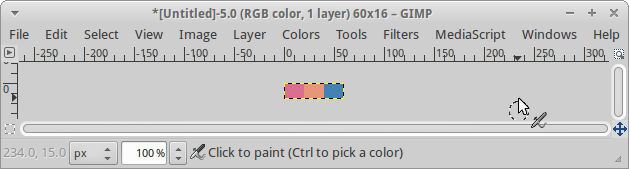
Although we've given two separate expressions, it's much more convenient to write a single instruction.
>(image-show(color-swatch"palevioletred" "darksalmon" "steelblue"))5
There's also a color-grid
Self Checks
Note: In order for the following self-checks to work, you will need to configure your account appropriately. If you have not done so already, open a terminal window and then type the following instructions (one per line, without the dollar sign).
$ /home/rebelsky/bin/csc151-setup
$ /home/rebelsky/bin/csc151-update
Check 1: Components
What do you expect for the value of each of the following expressions?
a. (irgb-red (irgb 200 100 50))
b. (irgb-green (irgb 200 100 50))
c. (irgb-blue (irgb 200 100 50))
Check 2: Components, Revisited
What do you expect the value to be of each of these expressions? (It's okay to guess.)
a. (irgb-red (color-name->irgb "red"))
b. (irgb-green (color-name->irgb "red"))
c. (irgb-blue (color-name->irgb "red"))
d. (irgb-red (color-name->irgb "darksalmon"))
e. (irgb-green (color-name->irgb "darksalmon"))
f. (irgb-blue (color-name->irgb "darksalmon"))